
Mobile authentication
Authentication redesigned
The Kie.la app lets you sign-in to websites, applications or computers from a mobile
with a one-time passcode
no email, no password, no SMS code, no sign-up.
One-time passcode
- 1 Open the Kie.la app on your phone
- 2 Copy the passcode shown in the app
- 3 Enter it on the website with your PIN
How it works
The first time you open the Kie.la app you need to create an account to identify yourself,
verify your credentials and set a 4-character PIN. You will never have to do that again.
Signing in to a site
takes only a few seconds, no email to enter, no password to type, no SMS code to wait for.
You no longer have to sign up.
Step 1
You open the app
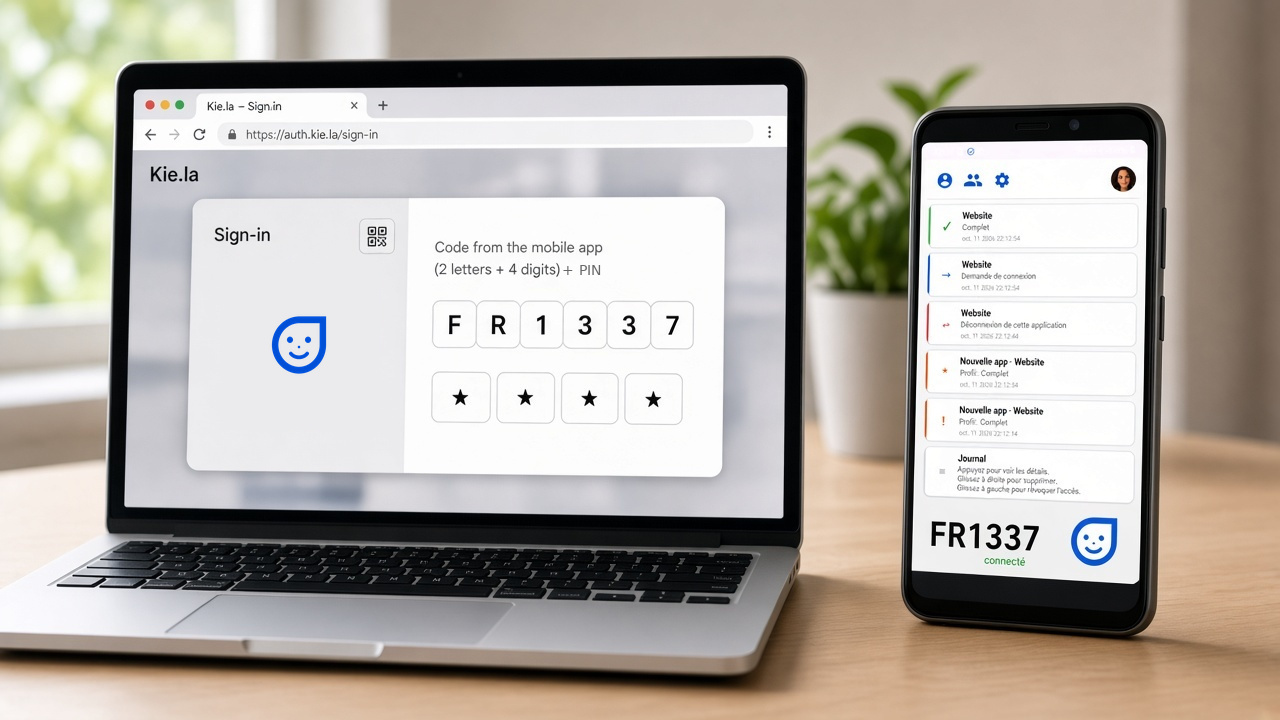
A one-time code is shown at the bottom of your mobile app. You can regenerate it by tapping Buddy.
Step 2
Sign in on a website
On the computer, enter the passcode and your 4-character PIN (a-zA-Z0-9) requested by the website. Authorize the sign-in.
Step 3
You're in
You are signed in on the website with your credentials.
You can also
With the same Kie.la account:
Authenticate a mobile app
Authenticate a session on a computer
Authenticate for your enterprise
Why Kie.la
Security. Built for people who use the web every day and for teams who want strong authentication that is simple to use.
Hackers break passwords
Your code is one-time use, and it is only valid for one minute.
Phone-first
Authentication starts from the mobile phone, your most trusted and faithful companion.
You stay in control
You can approve or revoke access to applications.
Too many clicks, too much typing
Designed for simplicity. Less than 10 seconds to sign in.
Once is enough
You enter and validate your credentials only once, for all of them.
It's new
And it's so cool.
For web and mobile application publishers
The Kie.la Console is where you register and run your web and Android apps.
01
Discover
Browse the application catalog.
02
Get started
Enter your application settings and secure authentication with DNS records.
03
Integrate
Our code starters are available in 7 languages.
04
Deploy
Access to your site takes less than 10 seconds. No more sign-up.
05
Fidéliser
Access to your application is simple, so users come back.
06
Piloter
Track your per-application and global dashboards.
07
Economiser
The cost of sign-up is drastically reduced.
08
Estimate
With the estimator you stay in control of your costs.
09
C'est parti !
Before
Classic login
- Create an account on each site
- Type email and password
- Confirm the email, sometimes an SMS
- Over a minute, drop-offs
Kie.la login
- No sign-up on your site
- One-time code and PIN
- Approve once on the phone
- Less than 10 seconds, no more sign-up
A lot of sign-ins? You are an integrator or a web agency
For enterprises
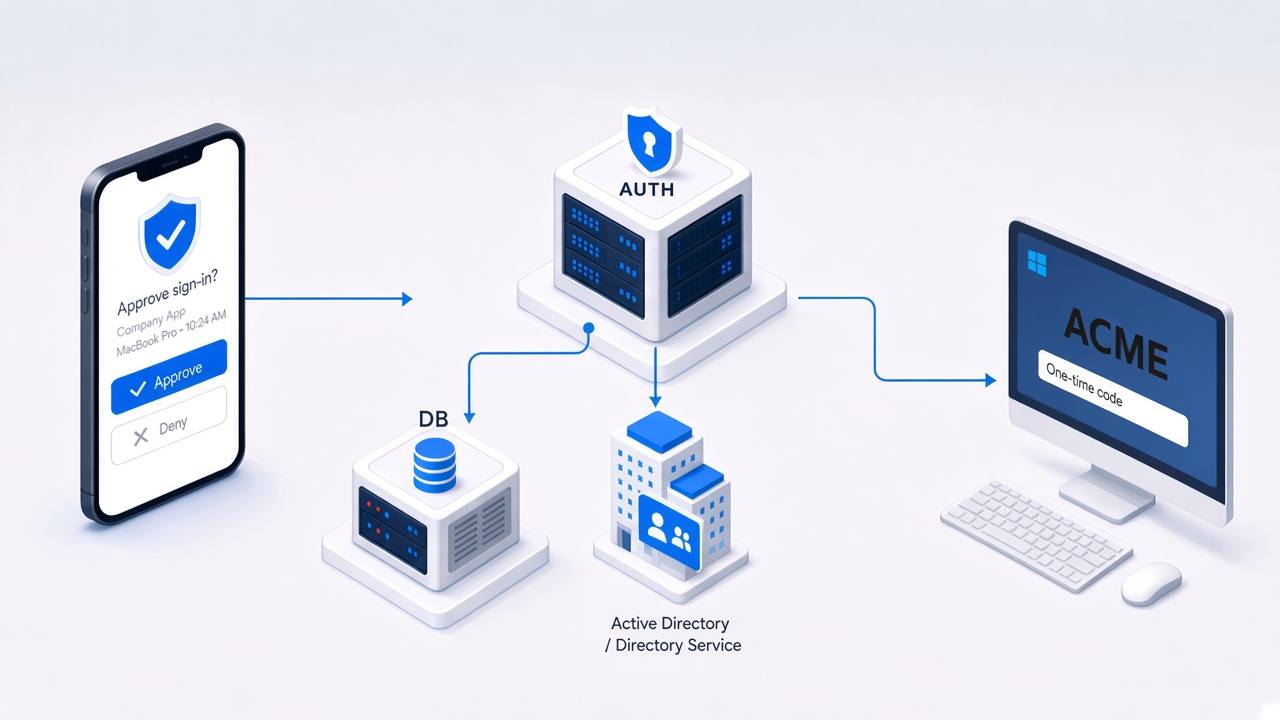
Install Kie.la on your infrastructure, authorize sign-ins from Active Directory, and offer a passwordless, more pervasive experience with a professional app talking to your own authentication infrastructure.
-
On your premises
Authentication stays on your hosts: Active Directory decides who may use Kie.la, under your policies.
-
Three surfaces
Sign-in on the workstation, for a mobile app, or for a web app: internet, intranet, or extranet. Integration with third-party applications is reviewed case by case.
-
Pay for use
One fee at deployment, then monthly per user. Cost depends on authenticating applications and the application perimeter.
For professional suites

We can provide SSO authentication for Google Workspace: Gmail, Drive, Calendar and the rest of the suite sign in through Kie.la instead of a password.
For developers
Integrate Kie.la sign-in with a reference test site and a sample Android app. After sign-in, your backend receives a verified session and the profile fields you choose to share.
Console
The console is where you register your new application in order to integrate Kie.la authentication.
Open the consoleAcademy
Academy is the site where you will find the documentation needed to integrate Kie.la authentication for your web application or your Android or iOS app.
Open AcademyReady to sign-in smarter?
Install Kie.la on your phone and use it on any participating website.
Get Kie.la on Google Play